The Best Apps for College Students (Spring 2027): Picks by Job
Quick answer
A good spring 2027 setup is four apps, one per job: a calendar you already check (Google Calendar or Apple Calendar), a way to get every syllabus deadline into it, one notes app (Notion, OneNote or Goodnotes), and one study tool for exams (Anki or Quizlet-style flashcards). Add a task app like Todoist or TickTick only if you also juggle work or clubs, and a focus app like Forest only if your phone is the problem.
Try it with your own syllabus
Every assignment, exam, and reading on your calendar in about 30 seconds. Free, no account.
PDF, Word, or a photo of a paper one. No syllabus handy? See a sample
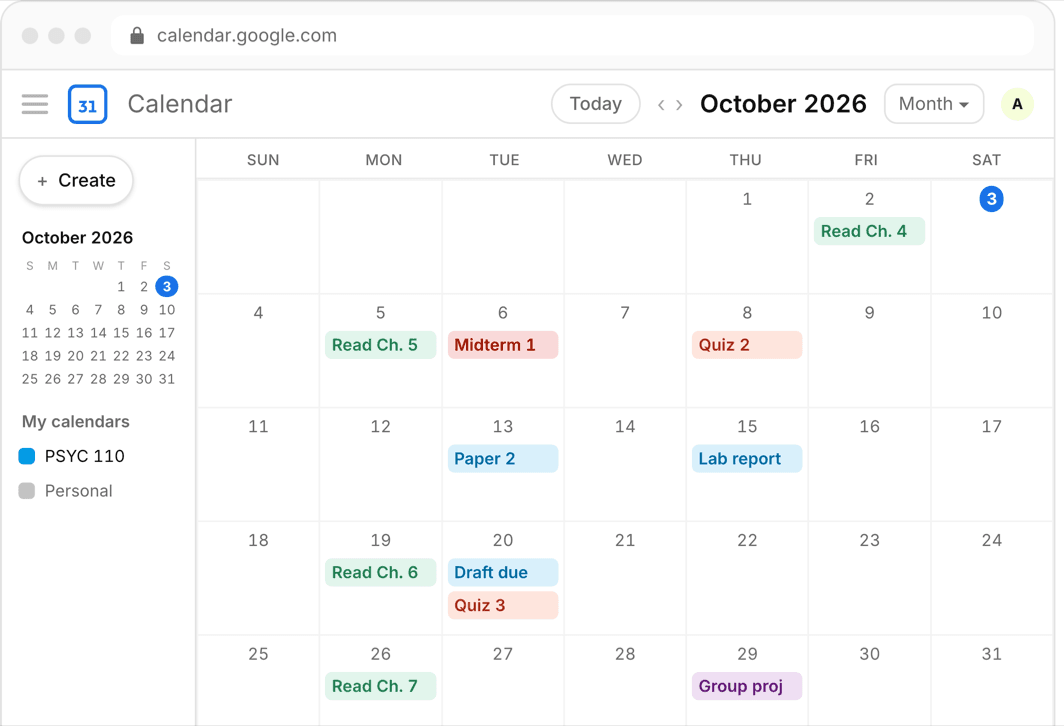
Most "best apps" lists are 30 apps long, and nobody installs 30 apps. This one is sorted by the job each app does, with one or two picks per job, so you can build a setup in an evening and actually keep it in January.
We picked apps that students already use widely, that have a real free tier, and that work on both iPhone and Android unless we say otherwise. Free tiers were checked on each app’s own site on November 27, 2026. Paid prices change often, so we link you to them instead of quoting them. We make Classmaite, which appears once below under syllabus deadlines; weigh that accordingly.
Or skip all of it
Upload the syllabus. Get the calendar.
Every assignment and exam on Google, Apple, or Outlook in about 30 seconds. One syllabus free, no account, no card.
Calendar: the one place every date lives
- Google Calendar. Free. Best if you use Gmail or your school runs on Google. Color-code a calendar per class and it syncs to every device. Skip it if your whole life is already in Apple Calendar.
- Apple Calendar. Free on iPhone, iPad and Mac. Best if you are all-Apple; it subscribes to Canvas and other school calendar feeds just as well. Skip it if you use Android or a Windows laptop.
- The rule that matters more than the app: if a date is not in the calendar you already look at, it does not exist. Separate planner apps fail because you forget to open them.
Deadlines from your syllabus: getting the dates in
Your learning platform only knows what professors post there. Many exams, readings and paper deadlines live only in the syllabus PDF, which is why students get surprised in week six.
- Canvas Student (or your school’s Brightspace, Blackboard or Moodle app). Free. Subscribe your calendar to its feed so posted assignments show up automatically. It will not include anything that is only in the syllabus.
- Classmaite (we make this). Upload a syllabus PDF, Word file or photo at myclassmaite.com/try with no account and it pulls out the dates and any grade weights the syllabus lists in about 30 seconds; you check them, then send them to Google Calendar or Apple Calendar. A free account keeps two classes; Pro is $9 a month. iPhone app, no Android app. Skip it if your professors post everything in Canvas.
- MyStudyLife. A free student planner for class timetables, tasks and exams, with a paid tier. Good if you want a dedicated planner app instead of your calendar. Skip it if you already live in Google or Apple Calendar.
Notes
- Notion. Flexible pages, databases and class dashboards. Notion offers free access for students with a school email; check its education page for the current plan. Skip it if you want to start taking notes in the next five minutes, since it takes setup.
- Microsoft OneNote. Free, with a notebook per class and typed or handwritten pages. Many schools already include Microsoft 365. Skip it if you dislike Microsoft apps.
- Goodnotes. Handwritten notes and PDF annotation on iPad, with a limited free tier and a paid plan. Best for students who write with a stylus. Skip it if you type your notes.
Tasks, for students who also work or run clubs
- Todoist. A clean to-do list with recurring tasks and priorities, free tier plus a paid plan. Good for weekly chores and work shifts around class.
- TickTick. To-dos, habit tracking and a built-in focus timer, free tier plus a paid plan. Good if you want tasks and a Pomodoro timer in one app.
- Skip a task app entirely if your only tasks are assignments; those belong on the calendar with the due date.
Focus
- Forest. You plant a virtual tree that dies if you leave the app, which works better than it sounds. Paid on iPhone, free with ads on Android; check the app store for the current price. Skip it if your phone is not what distracts you.
- Your phone’s own Focus or Digital Wellbeing mode. Free and already installed. Try this first.
Studying for exams
- Anki. Spaced-repetition flashcards. Free on desktop, the web and Android; the official iPhone app is paid. The best tool for memorization-heavy classes like biology, chemistry, anatomy and languages. Skip it for problem-solving classes, where practice problems beat flashcards.
- Your school’s tutoring center and past exams. Free, and they predict what is on the test better than any app.
Grades: knowing where you stand
- Your learning platform’s grade view. Free. Fine when your professor keeps the gradebook current, but weighted categories and missing scores often make the shown total wrong.
- A final grade calculator. Free calculators such as myclassmaite.com/tools/final-grade-calculator tell you what you need on the final from your current grade and the final’s weight. Classmaite also keeps a running grade from the scores you enter and the weights in your syllabus, and Pro shows what you need on the work that’s left.
The minimum setup, in one evening
- One calendar (Google or Apple), with a separate color per class.
- Every syllabus deadline in that calendar during week one, by hand or with a syllabus tool, plus your school’s spring 2027 dates.
- One notes app, chosen by how you take notes: typed (Notion or OneNote) or handwritten (Goodnotes).
- One study tool for your hardest memorization class (Anki).
- That is four apps. Add a task app or a focus app only if a real problem shows up in the first three weeks.
Free grade calculators
What do you need on the final?
Enter your current grade, how much the final is worth, and the grade you want. Get the exact score, with the math shown. No account, no email.
Final grade calculatorFrequently asked questions
What are the best free apps for college students?
Google Calendar or Apple Calendar, your school’s learning platform app, Microsoft OneNote, Anki on desktop or Android, and your phone’s built-in focus mode are all free, and Notion has a free plan with extra student access through a school email. That covers calendar, notes, studying and focus without paying for anything.
Do these apps work on Android?
Most do. Google Calendar, Notion, OneNote, Todoist, TickTick, Anki, Forest and MyStudyLife all have Android apps. Apple Calendar and Goodnotes are Apple-only, and Classmaite has an iPhone app plus a web app that works in any Android browser.
Does a college student need Notion?
No. Notion is great if you enjoy building a system, but a calendar plus a simple notes app does the essential job. The most common failure is spending the first two weeks designing a dashboard instead of putting deadlines on a calendar.
What apps help college students with ADHD stay organized?
Many students with ADHD say the system that sticks is the one that comes to them: deadlines in the calendar they already check, with reminders well before the due date, rather than a separate planner they have to remember to open. Getting every date in during week one, while energy is high, matters more than which app you pick. Talk to your school’s disability or accessibility office about accommodations too.
What should I set up before the first week of spring semester?
Put your school’s spring 2027 dates (first day, drop deadline, spring break, finals) in your calendar, then add every exam and major deadline from each syllabus as soon as you get it. That one evening of setup prevents most of the "wait, that was due today?" moments later in the term.