Coursicle Alternative: When You Need More Than a Class Schedule
Quick answer
Pick Coursicle if you are still choosing classes, building a schedule, or waiting for a seat in a full section. Pick Classmaite if you already have your classes and want every exam, assignment and reading from each syllabus in Google, Apple or Outlook Calendar. They do different jobs, and many students use both.
Try it with your own syllabus
Every assignment, exam, and reading on your calendar in about 30 seconds. Free, no account.
PDF, Word, or a photo of a paper one. No syllabus handy? See a sample
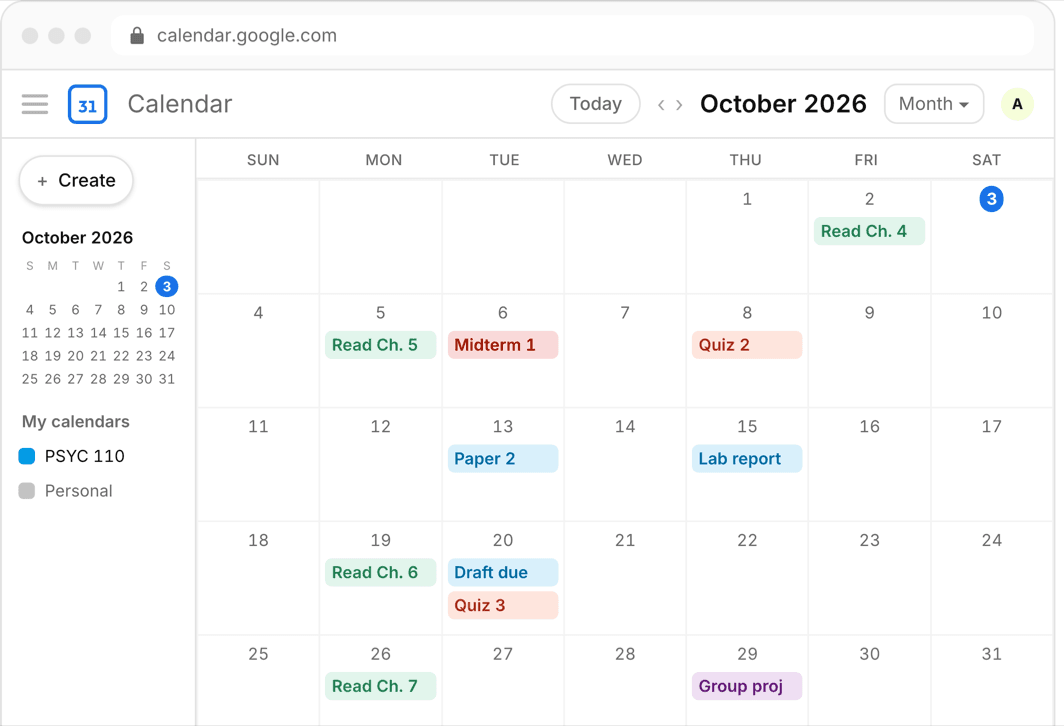
Coursicle is best known for the weeks before term. You pick classes, build a schedule, and get told when a seat opens. Classmaite starts after that. Once you have your classes, it reads each syllabus and puts the dates in your calendar. Searching for a Coursicle alternative often means you need the second job, not a replacement for the first.
We make Classmaite, so this is not a neutral review. Every claim about Coursicle was read from coursicle.com and its blog on 2026-11-26. Its home page is mostly a school picker, so we say less about it than we would like. Coursicle lists no prices on the pages we read, so we quote none.
Or skip all of it
Upload the syllabus. Get the calendar.
Every assignment and exam on Google, Apple, or Outlook in about 30 seconds. One syllabus free, no account, no card.
What each one is
Coursicle: a class schedule and registration helper, with an iPhone app. Its own blog calls it a schedule builder and assignment tracker. Its site menu lists Schedule, Tasks, Reminders, Share and Chat. Its app sends a notification when a class changes to open or closed, which is how students catch a seat. You pick your school first; the home page lets students request schools it does not yet support. Coursicle also runs a large blog that compares syllabus apps and has a post on adding your syllabus to Coursicle.
Classmaite: a syllabus-to-calendar tool on the web and iPhone (no Android). Upload a syllabus as a PDF, Word doc, photo or pasted text at myclassmaite.com/try with no account. It takes about 30 seconds. A review step comes first, then Google Calendar sync or an .ics for Apple or Outlook. Free calculators live at /tools, and Pro shows what you need on the work that’s left, using the weights in your syllabus.
Price
- Coursicle: the pages we read did not list prices or paid plans. Check the app before you rely on any feature.
- Classmaite: the first syllabus needs no account. A free account keeps two classes at a time. Pro is $9 a month, $29 per 6 months or $50 a year, after a 3-day trial that needs a card.
Feature-by-feature
- Picking classes and building a schedule: this is Coursicle’s main job. Classmaite does not help you choose classes. Win for Coursicle.
- Seat alerts: Coursicle notifies you when a class opens or closes. Classmaite has nothing like it. Win for Coursicle.
- Syllabus to calendar: Classmaite reads a syllabus, shows you every date to check, then sends it to Google Calendar or an .ics file. Coursicle blogs about syllabus upload, but we could not confirm how its version works or where the dates end up. Win for Classmaite, as far as we could verify.
- File types: Classmaite takes PDF, Word, photo and pasted text. We could not confirm what Coursicle accepts.
- Grades: Classmaite has free calculators, and Pro shows what you need on the work that’s left, using the weights in your syllabus. We found no grade tool on the Coursicle pages we read. Win for Classmaite.
- Sharing: Coursicle lists Share and Chat in its menu. Classmaite gives each class a share link so classmates add the same dates with no account. Different kinds of sharing; roughly even.
- Reminders: Coursicle lists Reminders and Tasks. Classmaite sends no reminder emails; reminders come from Google Calendar alerts and iOS notifications. Roughly even.
- LMS: Classmaite has Canvas sync on Pro, in beta, and subscribes to Blackboard, Brightspace and Moodle feeds. We found no LMS link on the Coursicle pages we read.
Using them together
The two fit in a line. Use Coursicle during registration to build a schedule and catch a seat. In syllabus week, run each syllabus through Classmaite so the exams and due dates land in your calendar. Neither one needs the other.
Who should pick which
- Pick Coursicle if registration is coming up, your section is full, or you want to see your weekly class blocks.
- Pick Classmaite if your classes are set and you want the dates from every syllabus in the calendar you already use.
- Pick both if you want help before term and during it.
Free grade calculators
What do you need on the final?
Enter your current grade, how much the final is worth, and the grade you want. Get the exact score, with the math shown. No account, no email.
Final grade calculatorFrequently asked questions
Is Classmaite a replacement for Coursicle?
Not really. Coursicle helps you choose classes, build a schedule and catch an open seat. Classmaite reads your syllabus and puts the exams and assignments in your calendar. Most students who use one could use the other too.
Does Coursicle tell you when a class opens?
Yes. Coursicle’s app sends a notification when a class changes to open or closed. Classmaite does not track seats.
Can Coursicle put my syllabus in Google Calendar?
Coursicle’s blog has a post on adding your syllabus to Coursicle, but we could not confirm on 2026-11-26 whether it exports dates to Google Calendar. Classmaite syncs to Google Calendar or gives you an .ics for Apple and Outlook.
Is Coursicle free?
The Coursicle pages we read on 2026-11-26 did not list prices. Classmaite reads your first syllabus free with no account, and a free account keeps two classes.